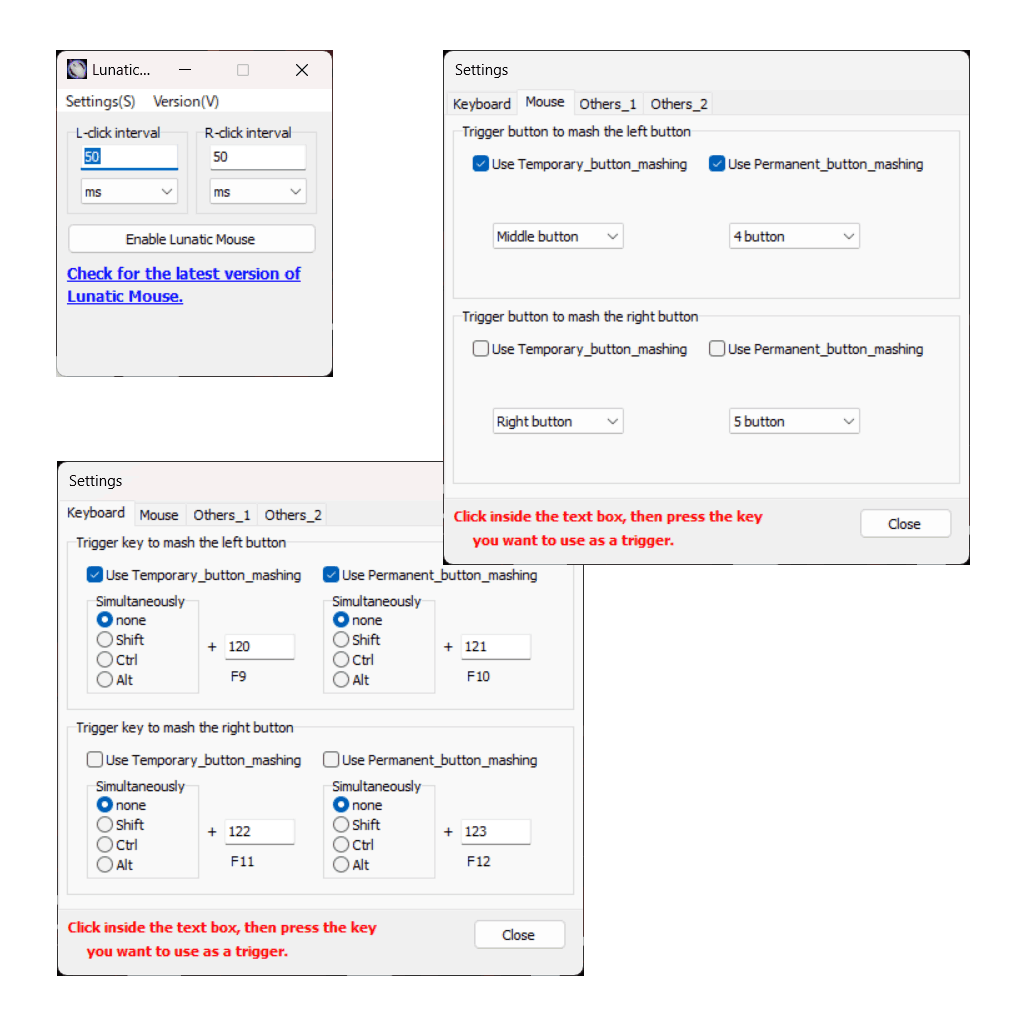
Overview of Lunatic Mouse
Lunatic Mouse is software that enables mouse button mashing in games, etc.
- The click interval can be set freely from milliseconds to minutes.
- Simultaneous rapid clicking of the right and left mouse buttons is possible.
- The mouse button mashing function can be toggled on/off using either the mouse or keyboard. The buttons or keys to be used can be freely specified.
- Two modes are available for mouse button mashing: “Temporary button mashing” which mashes the mouse button only while pressing a button or key, and “Permanent button mashing” which continues mouse button mashing even when the button or key is released.
Supported OS
Windows 11/10/7
Change log
ver 2.3.0 (2023/11/26)
- Created English version.
ver 1.0.0 (2003/10/12)
- First public release.
Precautions (Terms of Use)
- This Software is provided as freeware, and users can use it free of charge, regardless of personal or commercial use.
- Please read and agree to the terms of use before using this software.
- If you have any bug reports or feature requests regarding this software, please email us.
Download
I’m not good at English, so I made it with google translate. If you find any mistakes in the English of this software or this homepage, please let us know by email.
>> Click here for the Japanese version.
FAQ
Lunatic Mouse cannot start. The error message “Failed to set global mouse hook. Close the software.” is displayed.
Some games may include software (such as ‘nProtect GameGuard‘) to monitor and prevent fraud. In this case, unfortunately it is not possible to use Lunatic Mouse.